Player Overview
The player is built around one job: repeat the exact part of the song you are practicing.
Main Areas
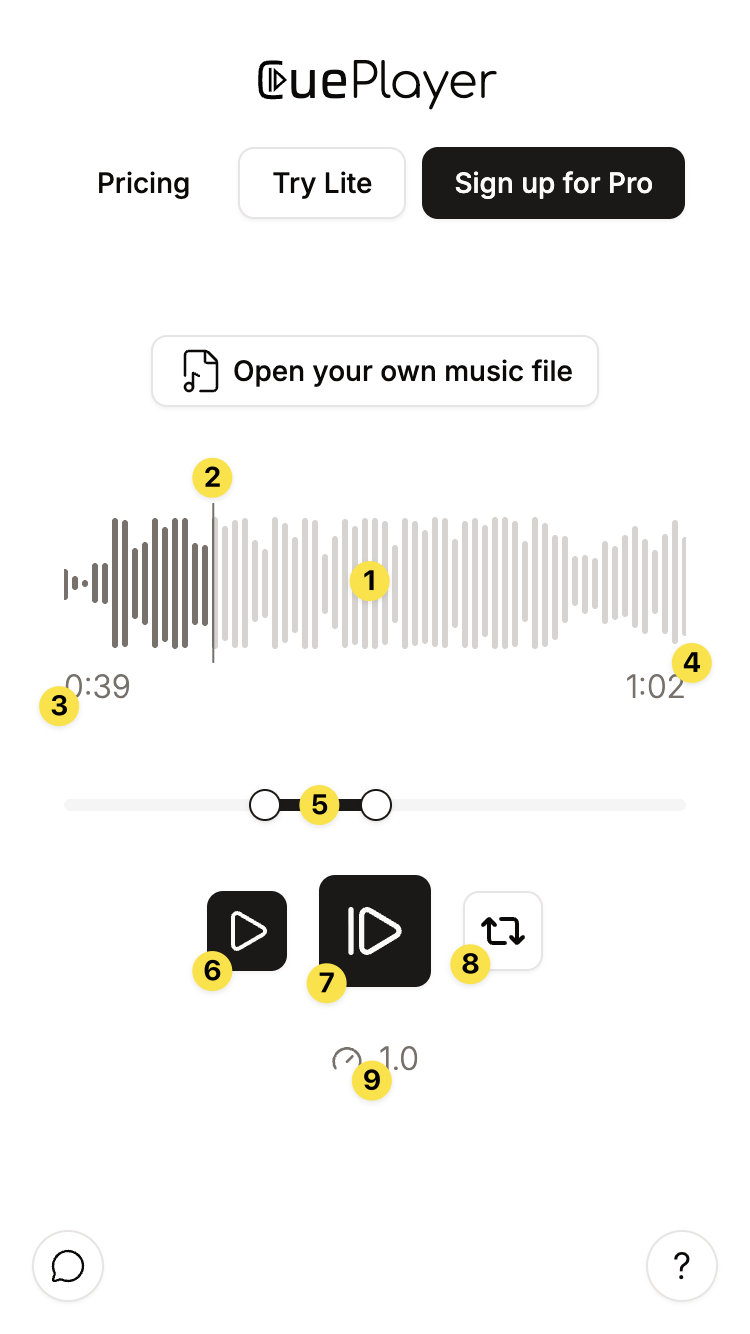
- Waveform visualizes the loaded audio.
Click any position: move cursor to this position. - Cursor visualizes the current playback position in the song.
Drag: move the playback position. - Start timestamp Shows timestamp of phrase-start.
Click: opens exact start-time editing.
Double-click: set the start to the current cursor. - End timestamp Shows timestamp of phrase-end.
Click: opens exact end-time editing.
Double-click: set the end to the current cursor. - Phrase slider moves the start and end handles.
- Continue button plays from the current cursor.
- Main play button
Click: starts from the phrase start. Press it while playing to pause.
Long-Press: allows to set a count-in. - Loop toggle repeats the phrase until you turn it off or pause.
- Speed control opens playback-speed controls.
The Two Play Buttons
Use the large center button for practice reps. It starts from the phrase start. In Cloud, while a Vamp (Beta) is active, it becomes Leave Vamp and continues playback without jumping back. Use the smaller pause button to its left to pause in Vamp mode.
Use the smaller play button when you want to keep listening from the current cursor inside the selected phrase.
Exact Adjustments
Dragging is fastest. Tapping a timestamp is more exact. Double-clicking a timestamp is useful while listening: pause at the moment you want, then double-click the start or end timestamp.
Vamps In Cloud (Beta)
Vamps are currently available only in Cloud. Their backward arrows show repeating passages inside the phrase. See Vamps (Beta) for creating, playing, bypassing, and saving them.